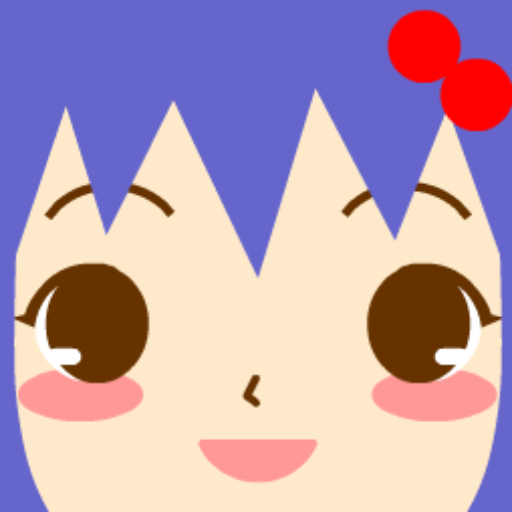
Remember the early 2010s internet? Square Face Icon Generator brings back that nostalgic charm. Originally created in 2013 by Japanese developer h071019, this beloved pixel avatar maker has been reimagined for modern browsers – no Flash required.
What is Square Face Icon Generator?
Square Face Icon Generator is a classic Japanese avatar maker (アイコンジェネレーター) that lets you create adorable, blocky pixel-style face icons. First released in February 2013 on icongenerators.net, it quickly became a favorite among internet users for creating unique profile pictures.
With Adobe Flash officially discontinued in 2020, many feared this charming tool would be lost forever. Sites like Flash Museum preserved the original, but now you can enjoy a fully modernized version that runs natively in your browser using HTML5 Canvas technology.
The Nostalgic Appeal
What makes Square Face Icon Generator special isn't just its functionality – it's the "retro, early-web charm" that users love. As one Reddit user described it: "nostalgia for yall 2013 internet folks". The simple, cute aesthetic captures a simpler time on the internet.
Key Features
- 200+ Customization Options: Mix and match across 12 categories including hairstyles, eyes, mouth, nose, eyebrows, cheeks, glasses, hats, clothes, and accessories
- Unlimited Color Choices: Customize every element with a full-spectrum color picker
- Random Generator: Click one button to instantly generate unique avatar combinations
- 256x256 Pixel Output: The classic resolution, crisp and perfect for any platform
- 100% Free: No hidden costs, no watermarks, no registration required
- No Flash Required: Works in any modern browser – Chrome, Firefox, Safari, Edge
- Privacy Protected: All processing happens locally in your browser
Perfect for Discord & Social Media
Based on search trends, the #1 use case for Square Face Icon Generator is creating Discord profile pictures. The cute, blocky style stands out perfectly in Discord servers and gaming communities.
| Platform | Why It Works |
|---|---|
| Discord | Cute PFPs that stand out in gaming communities and servers |
| TikTok | Memorable avatars that help build your personal brand |
| Twitter/X | Eye-catching profiles perfect for anonymous or creative accounts |
| YouTube | Channel icons that scale perfectly from thumbnails to banners |
| Gaming | Unique character avatars for Steam, Xbox, PlayStation profiles |
| Forums | Personalized identity across Reddit, DeviantArt, and communities |
How to Use Square Face Icon Generator
Creating your perfect square face avatar is simple and fun – just like in 2013!
Step 1: Choose Your Features
Select from 12 comprehensive categories:
- Skin: Choose your base skin tone
- Bangs & Side Hair: Multiple hairstyle options
- Eyes: From cute to cool expressions
- Nose & Mouth: Define your character's personality
- Eyebrows & Eyelashes: Add detail and expression
- Cheeks & Wrinkles: Blush, freckles, and more
- Glasses: Various frame styles
- Hats: Caps, headbands, accessories
- Clothes: Collars, shirts, neckwear
- Others: Special accessories and decorations
Step 2: Customize Colors
Use the intuitive color picker to personalize every element. The preview updates instantly as you make changes – a feature that wasn't in the original Flash version!
Step 3: Generate & Save
- Random Button: Not sure where to start? Click "Random" for instant inspiration
- Save Button: Download your 256x256 PNG image instantly
Square Face Icon Generator vs Picrew
Many users search for "Square Face Icon Generator Picrew" – and for good reason. Both are beloved avatar makers with Japanese origins. Here's how they compare:
| Feature | Square Face Generator | Picrew |
|---|---|---|
| Price | 100% Free | Free (with some paid) |
| Account Required | No | Optional |
| Style | Pixel/Blocky | Varies by creator |
| Customization | 200+ options | Varies |
| Output Size | 256x256 PNG | Varies |
| Works Offline | Yes (after loading) | No |
| Privacy | Local processing | Server-based |
If you love Picrew's character creators, Square Face Icon Generator offers a similar experience with its own unique retro charm.
Why Choose the Modern Version?
The Flash Problem
The original Square Face Icon Generator was built with Adobe Flash. When Flash was discontinued in December 2020, many classic web games and tools became inaccessible. While preservation projects like Flash Museum and Flashpoint saved the original, they require special software to run.
Our HTML5 Solution
Our modern version recreates the beloved experience using:
- HTML5 Canvas: Native browser support, no plugins needed
- Responsive Design: Works on desktop, tablet, and mobile
- Touch-Friendly: Optimized for smartphone creation
- Instant Loading: No Flash Player installation required
- Cross-Platform: Works on Windows, Mac, Linux, iOS, Android
Tips for Creating Great Avatars
- Start with skin tone: Build your avatar from the foundation up
- Match your vibe: Going for cute? Cool? Mysterious? Choose features accordingly
- Try the random button: Discover unexpected combinations for inspiration
- Use brand colors: Incorporate your personal or channel colors for consistency
- Create variations: Make different versions for different platforms
- Screenshot favorites: The random generator creates endless possibilities
A Piece of Internet History
Square Face Icon Generator represents a beautiful era of the internet – when simple, creative tools brought joy to millions. The original has a 4.2/5 rating on Flash Museum with over 355 votes, testament to its enduring popularity.
Whether you're a longtime fan rediscovering this classic or a newcomer drawn to its retro charm, Square Face Icon Generator continues to bring smiles to faces around the world.
Ready to create your square face avatar? It's free, fast, and fun – just like the good old days of 2013. No Flash required, no account needed. Start creating now!